How to Write Better Prompts for an Uncensored AI Generator
Practical, step-by-step how-to for crafting repeatable, consistent uncensored AI prompts—seed control, modular prompts, LoRA/IP-Adapter, ControlNet, negatives, and fixes.
When people say they struggle with “uncensored ai prompts,” they rarely mean imagination is the problem—they mean repeatability is. You get one great frame, then your character drifts, hands glitch, or the next scene won’t match the last. This guide shows you how to make your prompts consistent and reproducible across scenes using a disciplined workflow: seed control, modular prompts, character anchors (LoRA/Textual Inversion/IP‑Adapter), pose/composition guidance (ControlNet), targeted negatives, and surgical inpainting/refinement. If you need a baseline definition of an uncensored AI generator, see the internal explainer: What is an uncensored AI generator.
Key takeaways
Consistency starts with determinism: fix your seed, checkpoint/hash, sampler, steps, CFG, resolution, and token order before you iterate.
Structure prompts into stable blocks—Identity | Pose | Scene | Style—and change one variable at a time to see clear deltas.
For character continuity, combine a trained token (Textual Inversion or LoRA) with a reference anchor (IP‑Adapter) and keep denoise low in img2img chains.
Use ControlNet OpenPose (optionally stack Depth/Canny) for pose and layout fidelity; keep weights balanced so the text prompt still has authority.
Maintain a compact, weighted negative set targeting anatomy failures; fix persistent issues with local inpainting and a high‑res refinement pass.
Log everything. A minimal metadata schema and experiment log make “uncensored ai prompts” reproducible, not lucky.
Before You Begin: Tools, Versions, and Setup
This tutorial assumes you work in Stable Diffusion ecosystems such as AUTOMATIC1111 (A1111) or ComfyUI with SDXL/SD3‑class models.
If you prefer a hosted, one‑click workflow, you can still apply the same prompt discipline in a platform like DeepSpicy—the main difference is that you’ll control fewer low‑level knobs and rely more on prompt structure, reference images, and targeted fixes.
Software: A1111 current stable (check “Seed breaking changes” if you re‑run old seeds), or ComfyUI with workflow save/load enabled. Enable PNG metadata writing in A1111 so parameters are embedded for recovery.
Hardware: 12–24 GB VRAM is comfortable for SDXL with ControlNet/refiners; 8 GB can work with smaller batches/lower resolutions.
Models: Use a known SDXL/SD3.x checkpoint and note its exact hash. If you switch checkpoints, you’ve changed the experiment.
Safety: Generate lawful, consensual content only; follow local laws and platform policies.
References for reproducibility mechanics: see Hugging Face Diffusers guidance on seeds/schedulers and A1111 documentation for metadata and version caveats: Diffusers seeding, A1111 seed breaking changes, and A1111 Features (PNG Info, long prompts).
Reproducibility Fundamentals for uncensored ai prompts
Exact or near‑exact re‑runs require these invariants to match:
Note: some hosted “one‑click” generators won’t expose every item in this list (or let you see hashes). In that case, treat reproducibility as best‑effort: keep the prompt blocks and token order stable, reuse the same reference images, stick to the same aspect ratio/resolution options the UI provides, and save/duplicate generation settings whenever the product supports it.
Seed
Model version/checkpoint hash
Sampler/scheduler
Steps
CFG (guidance) scale
Resolution (W×H)
Prompt and negative prompt text, including token order and weights
Diffusers and A1111 both document that any deviation can change your output trajectory; even punctuation and token order matter. See Diffusers on reusing seeds and A1111’s reproducibility notes cited above. Also recognize that driver/CUDA/PyTorch version drift can introduce floating‑point differences; pin your environment for important runs.
Minimal metadata schema (copy into your notes or a JSON file):
{
    "model_hash": "sdxl_1_0_abc123",
    "checkpoint_name": "sdxl_base_1.0",
    "seed": 123456789,
    "sampler": "DPM++ 2M Karras",
    "steps": 30,
    "cfg_scale": 7.5,
    "width": 832,
    "height": 1216,
    "prompt": "<IDENTITY> | <POSE> | <SCENE> | <STYLE>",
    "negative_prompt": "(worst quality:2), (low quality:2), deformed, bad anatomy, bad hands, extra fingers:1.5, blurry, jpeg artifacts",
    "denoise": 0.0,
    "controlnet_stack": [
      {"type": "openpose", "weight": 0.9, "start": 0.0, "end": 1.0},
      {"type": "depth", "weight": 0.7, "start": 0.0, "end": 1.0}
    ],
    "lora_list": [
      {"name": "char-hero_v1", "weight": 0.8}
    ],
    "embeddings": ["<charToken>"]
  }
Experiment log (CSV header example):
run_id,datetime,model_hash,seed,sampler,steps,cfg,w,h,denoise,lora_names,lora_weights,controlnets,negatives,prompt_delta,notes,image_file
Quick verification checklist for a re‑run:
Same checkpoint hash and extensions loaded
Same seed/sampler/steps/CFG/resolution
Same prompt/negatives (token order/weights checked)
Same ControlNet maps, start/end, and weights
Build a Modular Prompt That You Can Repeat
Think of your prompt as a rig, not a paragraph. Four blocks keep it stable and testable:
Identity: the character token(s), core traits, distinctive markers. Put this early in the prompt for priority in SDXL/SD3.x.
Pose: an explicit pose description if you’re not using ControlNet; otherwise keep text minimal and feed a pose map via OpenPose/DW‑Pose.
Scene: environment, lighting, camera (lens/focal length), composition cues.
Style: rendering style, color palette, film grain, post‑processing hints. Use modest weights so style doesn’t wash out identity.
Prompt template (fill the brackets; keep tokens in order):
<IDENTITY> | <POSE> | <SCENE> | <STYLE>
Example fill (neutral wording):
<charToken>, freckled, shoulder-length hair, small scar over left brow | seated, three-quarter view, relaxed hands visible | indoor studio, soft key light, 50mm, mid-shot, shallow depth of field | photorealistic, muted palette, fine skin detail (1.2)
Token weighting and order tips:
Front‑load identity terms and trained tokens. In SDXL, early tokens bias composition and subject placement.
Use light weights first (1.1–1.3) and only escalate if the concept under‑fires.
Add a simple scene baseline you can reuse across shots; change one variable per iteration and log the delta.
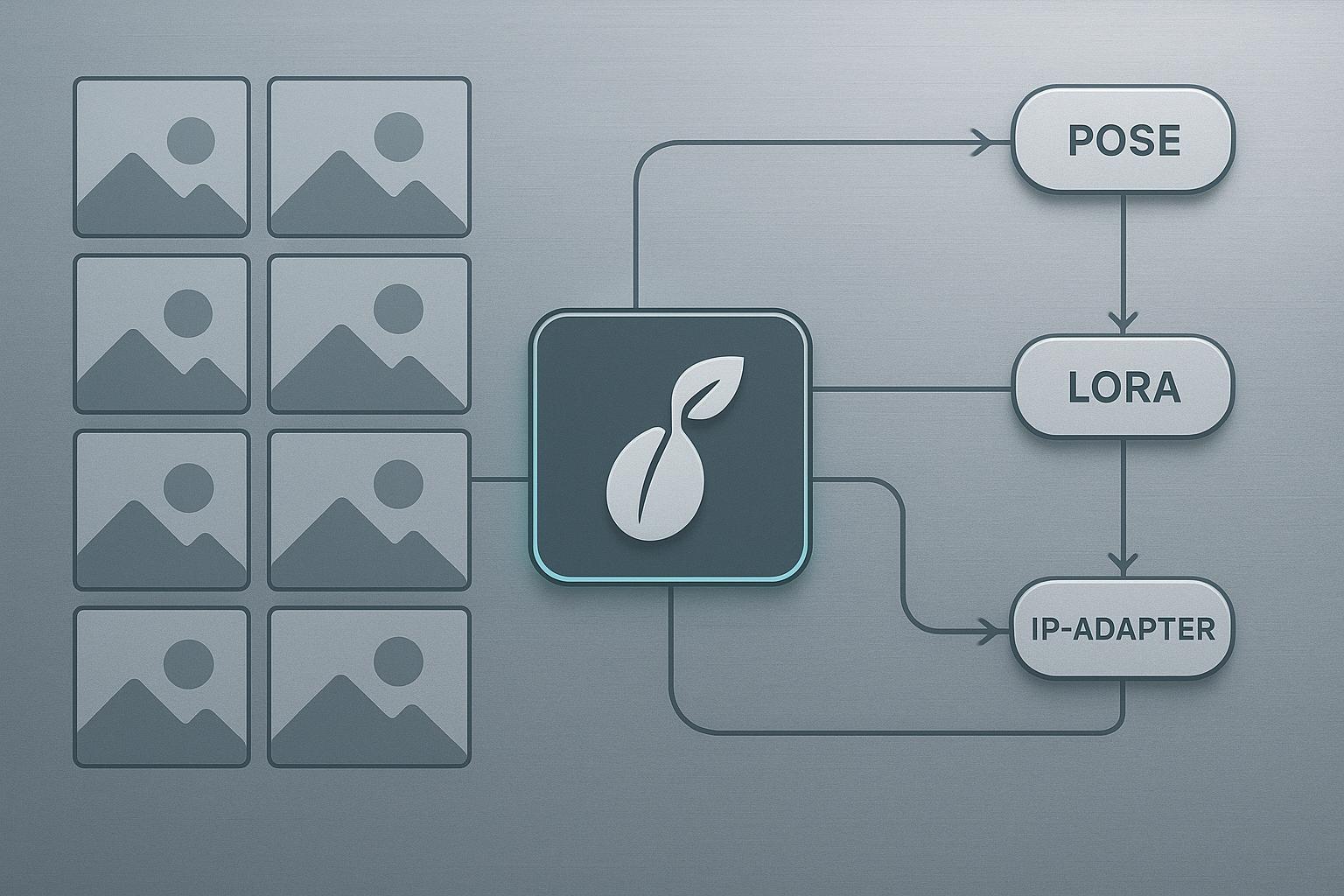
Optional diagram to visualize the pipeline:
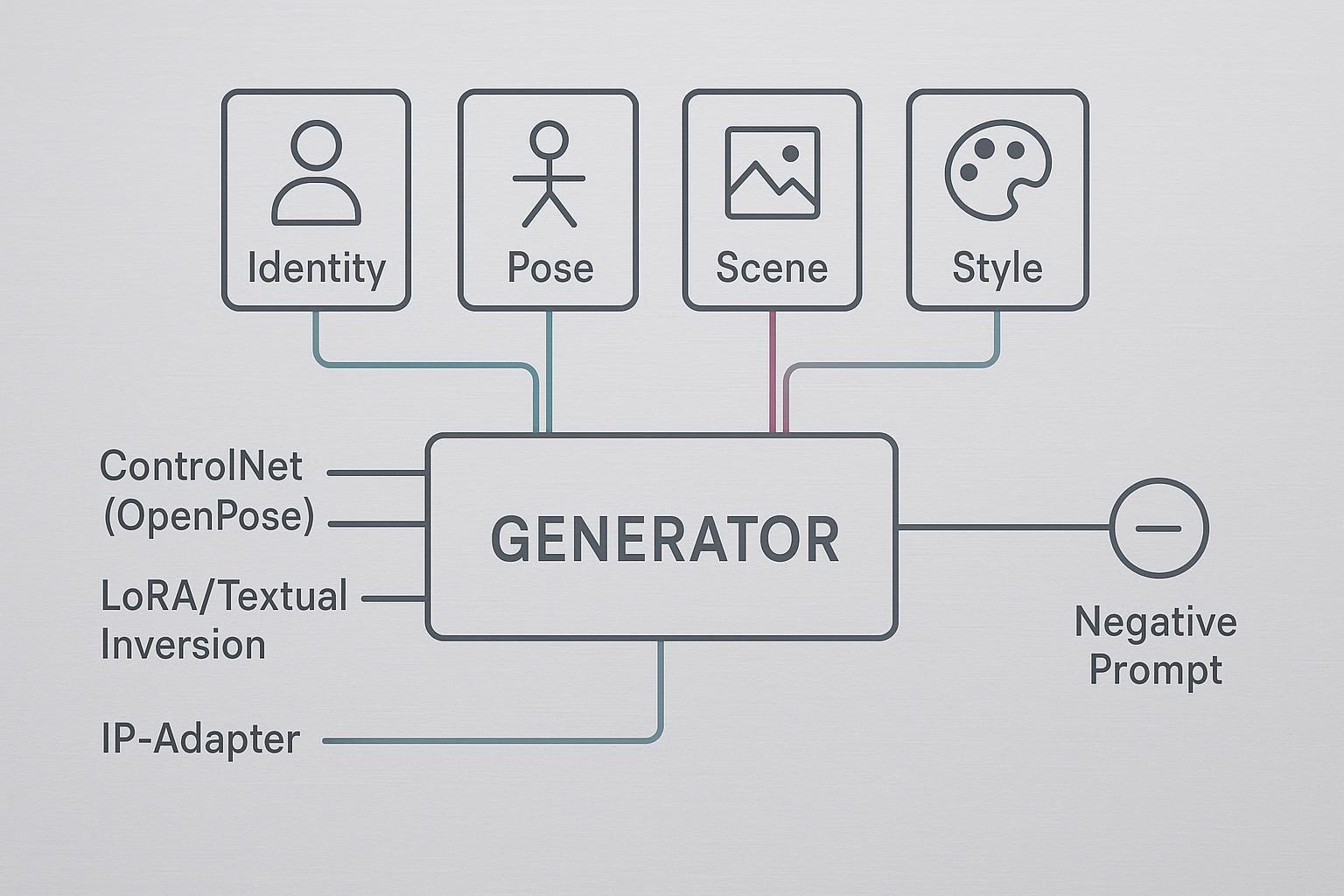
Advanced Controls: LoRA, Textual Inversion, IP‑Adapter, and ControlNet
Character consistency works best when you layer anchors:
Textual Inversion: learn a short token for your character; good for nuanced identity cues with minimal overhead.
LoRA: train a character LoRA on 10–20 varied images (angles, lighting, expressions). Start inference weights around 0.6–1.0 and tune.
IP‑Adapter: feed a face/body reference to anchor identity/style without training; combine with ControlNet for structure.
ControlNet: OpenPose or DW‑Pose for skeletal accuracy; consider adding Depth or Canny for composition.
Recommended starting ranges (practitioner defaults drawn from community docs):
Control | Parameter | Start here | Notes |
|---|---|---|---|
LoRA (character) | weight | 0.6–1.0 | Too high can overfit; too low drifts |
Textual Inversion | token order | early | Place before scene/style terms |
IP‑Adapter | ref strength | moderate | Tune per backend; qualitative slider |
ControlNet OpenPose | weight | 0.75–1.0 | Pixel Perfect on; extend end to 1.0 for strict match |
ControlNet Depth | weight | 0.5–0.8 | Helps with layout; don’t overpower text |
Img2img (pose change) | denoise | 0.25–0.45 | Lower preserves identity/pose |
Img2img (scene change) | denoise | 0.45–0.7 | Allows bigger background shifts |
SDXL base→refiner | steps/CFG | ~30 total, CFG 7–8 | Switch refiner ~60% progress |
Why this works, briefly:
The trained token (LoRA/Textual Inversion) carries identity across shots.
IP‑Adapter locks facial cues; ControlNet enforces body/pose.
Lower img2img denoise keeps the latent “near” your seed solution.
Citations for deeper reading: SDXL base/refiner defaults and samplers at stable‑diffusion‑art.com, ControlNet guides, and Diffusers seeding guidance noted earlier. See: SDXL model guide, ControlNet complete guide, and ControlNet with SDXL.
Troubleshooting and Failure Diagnosis
Use this matrix to move fast from symptom to fix.
Artifact | Likely cause | Targeted fix |
|---|---|---|
Extra fingers, fused limbs | Weak anatomy priors at current steps/CFG; model prone to hand errors | Add targeted negatives (bad anatomy, bad hands, extra fingers:1.5); raise steps modestly; inpaint hands locally |
Identity drift across scenes | LoRA weight too low/high; denoise too high; no reference | Tune LoRA 0.6–1.0; reduce denoise to 0.25–0.45; add IP‑Adapter face |
Pose mismatch | ControlNet weight too low or ends too early; wrong preprocessor scale | Raise to 0.9–1.0; Pixel Perfect on; extend end to 1.0; verify OpenPose/DW‑Pose |
Concept bleeding from style LoRAs | Overlapping LoRAs or weights too strong | Lower style LoRA; isolate runs; add early identity anchors |
Inconsistent re‑runs with “same” settings | Version drift; seed‑breaking update; different checkpoint | Pin software; review A1111 seed‑breaking notes; confirm model hash |
For stubborn issues, run a high‑res refinement chain: base result → SDXL refiner pass at denoise ~0.4–0.5 → final upscaler (ESRGAN/Real‑ESRGAN). Practitioner guidance summarized in the SDXL model guide and AI upscaler overview.
Templates and Reproducibility Kit (Inline)
Prompt template (reuse across scenes):
<IDENTITY>, <distinct traits> | <POSE or ControlNet pose> | <SCENE: environment, lighting, camera> | <STYLE: rendering, palette, texture (1.1–1.3)>
Minimal JSON schema (repeat of earlier, ready to paste):
{
    "model_hash": "",
    "checkpoint_name": "",
    "seed": 0,
    "sampler": "",
    "steps": 0,
    "cfg_scale": 0,
    "width": 0,
    "height": 0,
    "prompt": "",
    "negative_prompt": "",
    "denoise": 0.0,
    "controlnet_stack": [],
    "lora_list": [],
    "embeddings": []
  }
CSV header + sample row:
run_id,datetime,model_hash,seed,sampler,steps,cfg,w,h,denoise,lora_names,lora_weights,controlnets,negatives,prompt_delta,notes,image_file
  r42,2026-03-20T10:24Z,sdxl_1_0_abc123,123456789,DPM++ 2M Karras,30,7.5,832,1216,0.35,"char-hero_v1","0.8","openpose:0.9;depth:0.7","bad anatomy;bad hands;extra fingers:1.5","scene bg from studio→alley","hands fixed via inpaint","r42_832x1216.png"
Quick re‑run checklist (print and stick near your monitor):
Confirm checkpoint hash and extensions
Lock seed; don’t touch sampler/steps/CFG mid‑series
Reuse prompt blocks in the same order
Reuse or reload the same ControlNet maps
Log every change
Example: Running a Reproducible Workflow in DeepSpicy (Neutral)
You can apply the same consistency discipline in a hosted, one‑click environment like DeepSpicy. The goal is the same—reduce “lucky shots” by controlling what the UI actually exposes.
Paste your modular prompt using the same block order (Identity → Pose → Scene → Style). Keep the Identity block unchanged across a scene set.
If the product supports saving/duplicating generations or presets, duplicate the first successful setup before you change anything. If it supports a seed lock, enable it; if not, keep everything else stable and iterate in small deltas.
Use reference images when available (for example, reusing the same character reference) so identity cues don’t reset between scenes.
Keep a compact negative prompt set and only add one new negative at a time when you see a recurring failure (hands, extra limbs, warped face).
When an artifact persists, fix it locally with inpainting/region edits instead of rewriting the whole prompt. That preserves the parts that are already working.
This example stays tool‑agnostic on purpose: the specifics vary by interface, but the habit is consistent—stable prompt blocks, small changes, reuse references, and repair locally.
What to Do Next
If you need a refresher on definitions and trade‑offs, read the internal explainer: What is an uncensored AI generator.
Comparing hosted vs self‑hosted tools and budgets? See the buyer’s overview: AI porn generator — the ultimate guide for buyers.
Keep practicing the routine: lock invariants, iterate one change at a time, log everything. That’s how “uncensored ai prompts” become a reproducible system, not a guessing game.
References and further reading (selected):
Determinism and seeds: Hugging Face Diffusers — reusing seeds
A1111 metadata and seed parity notes: A1111 Features, Seed breaking changes
SDXL base/refiner and samplers: SDXL model guide, Samplers explained
ControlNet usage and SDXL specifics: ControlNet complete guide, ControlNet with SDXL
Anatomy fixes and negatives: Common problems & fixes, Learn Prompting — fixing deformed generations